示例二:高级用法,编辑后置函数,实现把每个请求的请求参数、响应数据提交到日志接口
添加一个“Post Function”插件
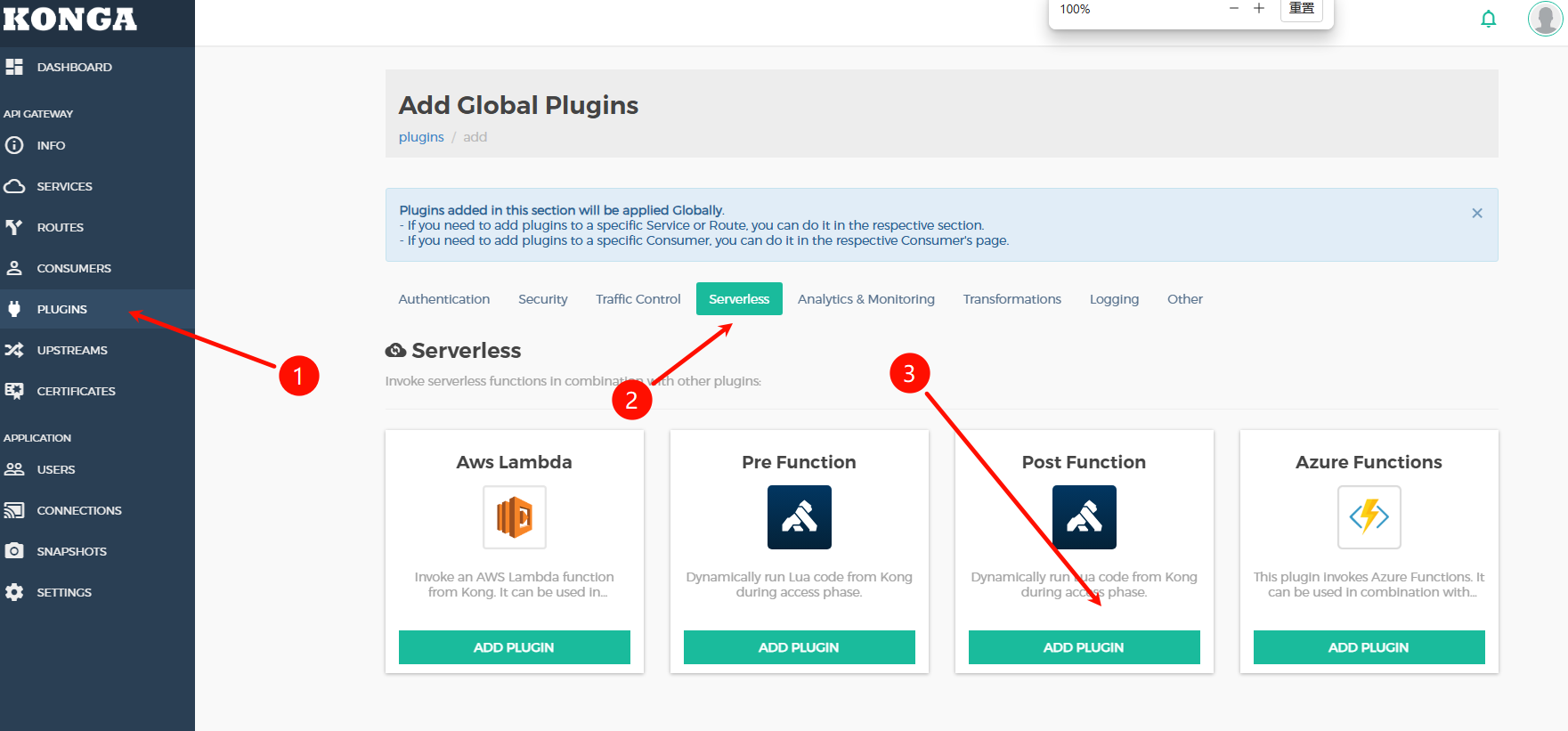
access 字段输入下面内容回车
kong.ctx.shared.request_body = kong.request.get_raw_body() or ''
body_filter 字段输入下面内容回车
kong.ctx.shared.response_body = (kong.ctx.shared.response_body or '') .. (ngx.arg[1] or '')
log 字段输入下面内容回车,其中接口https://log.xxx.top/api/log替换成你的接口
local cjson = require('cjson.safe'); local data = { request = { uri = kong.request.get_path(), method = kong.request.get_method(), headers = kong.request.get_headers(), query = kong.request.get_query(), body = kong.ctx.shared.request_body }, response = { status = kong.response.get_status(), headers = kong.response.get_headers(), body = kong.ctx.shared.response_body }, client_ip = kong.client.get_ip(), timestamp = ngx.now() }; local json_body = cjson.encode(data); local function send_log(premature, body) if premature then return end; local http = require('resty.http'); local httpc = http.new(); httpc:set_timeout(5000); local res, err = httpc:request_uri('https://log.xxx.top/api/log', { method = 'POST', body = body, headers = { ['Content-Type'] = 'application/json' }, ssl_verify = false }); if not res then kong.log.err('Failed to send log: ', err) else kong.log.notice('Log sent, status: ', res.status) end end; local ok, err = ngx.timer.at(0, send_log, json_body); if not ok then kong.log.err('Failed to create timer: ', err) end
配置截图如下
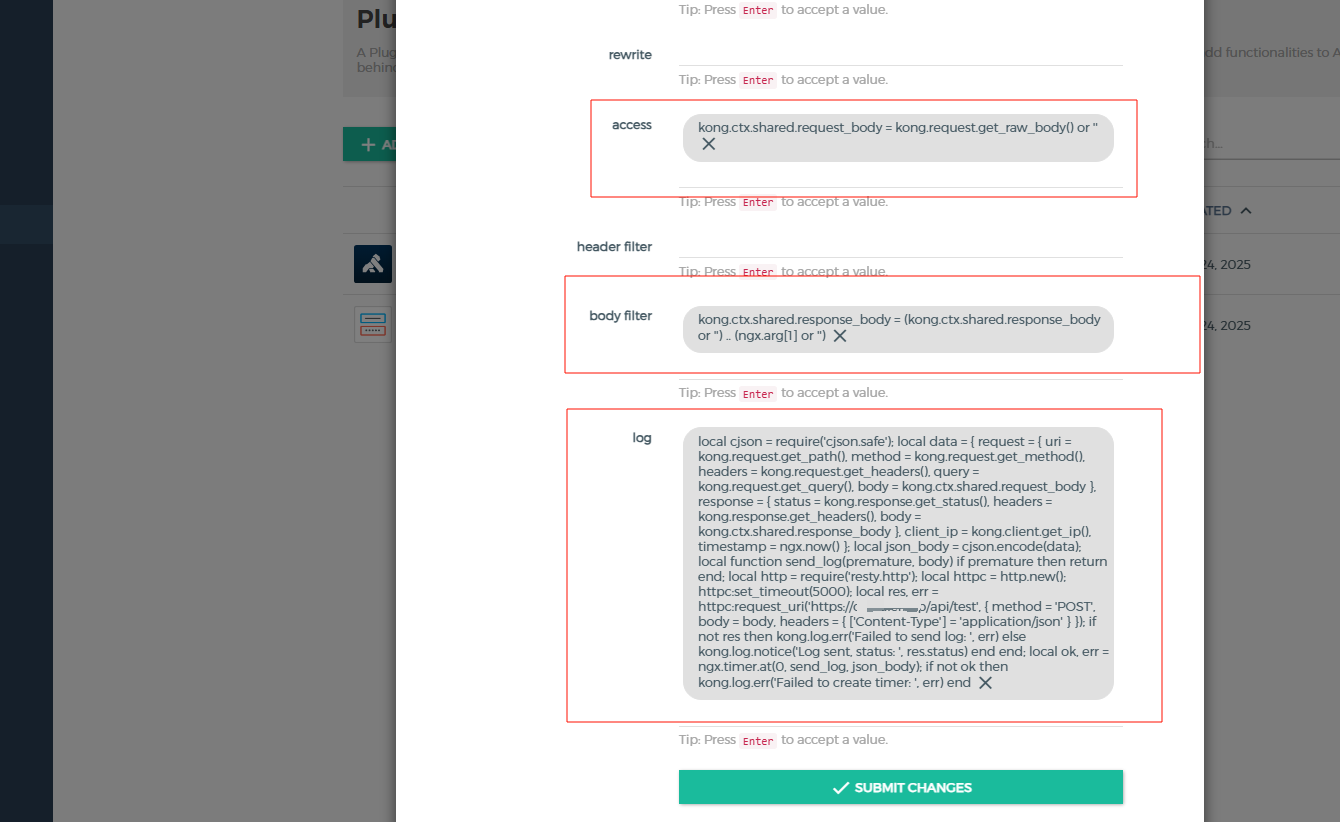
配置完并启用后,kong每个请求都会触发这个后置函数,并想目标接口发起的 POST 请求,参数参考如下
{
"request": { //请求信息
"uri": "\/api\/generate",
"headers": {
"content-length": "50",
"user-agent": "Mozilla\/5.0 (Windows NT 10.0; Win64; x64) AppleWebKit\/537.36 (KHTML, like Gecko) Chrome\/142.0.0.0 Safari\/537.36 Edg\/142.0.0.0",
"origin": "http:\/\/gitcard.hd.luler.top",
"referer": "http:\/\/gitcard.hd.luler.top\/",
"accept-encoding": "gzip, deflate",
"content-type": "application\/json",
"host": "gitcard.hd.luler.top",
"x-credential-username": "zhangsan",
"accept": "*\/*",
"x-credential-identifier": "zhangsan",
"x-consumer-username": "zhangsan",
"x-consumer-id": "1b1f6295-633f-4795-8c47-9af8a62888ec",
"accept-language": "zh-CN,zh;q=0.9,en;q=0.8,en-GB;q=0.7,en-US;q=0.6"
},
"body": "{\"repo_url\":\"https:\/\/github.com\/microsoft\/vscode\"}",
"query": [],
"method": "POST"
},
"client_ip": "14.145.46.xxx", //客户端ip
"timestamp": 1766571822.627,
"response": { //接口响应
"headers": { //相应头
"date": "Wed, 24 Dec 2025 10:23:39 GMT",
"content-length": "276",
"connection": "close",
"x-kong-upstream-latency": "5906",
"server": "uvicorn",
"via": "kong\/2.8.5",
"x-kong-proxy-latency": "30",
"content-type": "application\/json"
},
"status": 200, //状态码
"body": "{\"success\":true,\"message\":\"卡片生成成功\",\"data\":{\"owner\":\"microsoft\",\"repo_name\":\"vscode\",\"image_url\":\"\/images\/microsoft\/vscode.png\",\"filename\":\"vscode.png\",\"repo_info\":{\"description\":\"Visual Studio Code\",\"stars\":179950,\"forks\":37022,\"issues\":12223,\"contributors\":328}}}"
}
}


